
Features
Everything your team needs to run personalization
From the first catalog to the last contract: one place for your team, one simple website for your buyers.
The buyer website
A website for each building, with your brand, that buyers enjoy using.
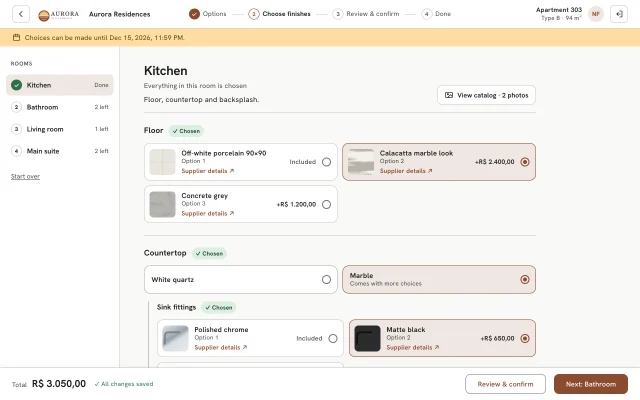
Your logo and colour
Every page carries your logo and brand colour.
Our link or your domain
app.configdar.com/your-building, or a domain of your own.
Phones first
Designed for phones, great on computers and tablets.
Photos and supplier links
Every option shows its photo and a link to the supplier.
Room photos
Each room's photo gallery opens in one tap.
Live total
The total updates with every choice, and every choice is saved.
Payment plans
Up to 12 monthly payments on the day the buyer chooses.
Standard finishes in one click
Buyers happy with the standard finishes can accept them at once.
English and Portuguese
Buyers switch language whenever they want.
Set up
Quick to set up, easy to change until you publish.
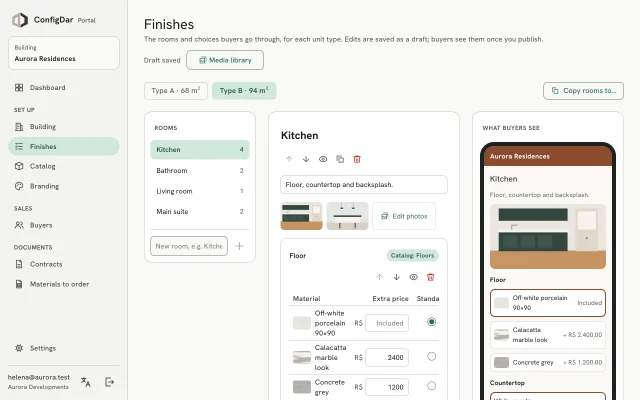
Catalog by category
Materials with names, photos and supplier links.
Paste from a spreadsheet
Add many materials at once; drop photos named like them.
Finishes per unit type
Rooms and choices for each type of apartment.
Prices per option
Set the standard option and what each upgrade costs.
Follow-up questions
Choices that only appear when an option needs them.
Copy rooms
Reuse the rooms of one unit type in another.
Draft, then publish
Edit in peace; buyers see changes only when you publish.
Live preview
See exactly what buyers will see while you edit.
Follow-up
Know where every apartment stands, without a single phone call.
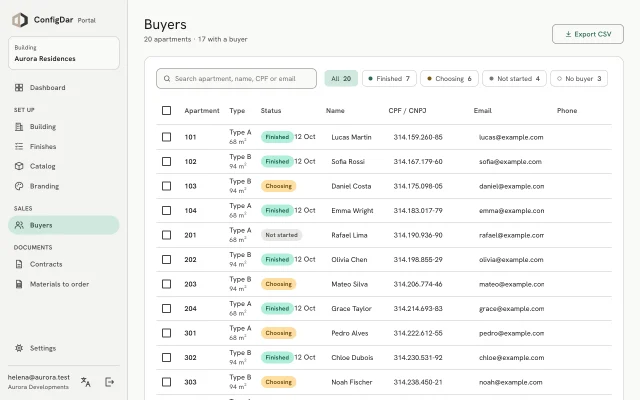
Buyer statuses
Finished, choosing, not started or no buyer yet.
Search and filters
Find any apartment, buyer, CPF or email.
Emails to buyers
Invites and reminders, each with the buyer's own details.
Choice deadline
Choices lock at the end of the day you choose.
Dashboard
Progress of the whole building at a glance.
Documents
The paperwork is ready the moment buyers finish.
A contract per buyer
With every choice, the total and the payment plan, as an editable Word file.
Finish with standard finishes
Complete buyers who never chose, in bulk.
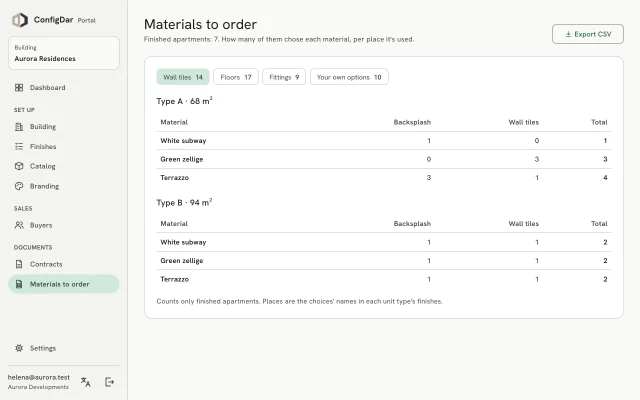
Materials to order
How many of each material, per unit type and room.
Exports
Buyers and materials as CSV; the final export as Excel or PDF.
Security and privacy
Your buyers' data, handled with care.
Stored in Brazil
On Google Cloud in São Paulo.
Sign-in by email code
Buyers get a one-time 6-digit code; no passwords to leak.
Separate access
Buyers see only their apartment; your team sees only your buildings.
Two-step sign-in for our staff
ConfigDar admins confirm every sign-in with an authenticator app.
See ConfigDar with your next building
In 20 minutes we'll show you the Portal and the buyer website with a real example, and answer your questions.
20-minute call · in English or Portuguese · no commitment